Ready to start CSS?
Hey! You made it! How did you feel about HTML? Think it's boring? Bland? Well, CSS is where we start designing and bringing our dreams to fruition. HTML is the fabric, but CSS is the dye, the sequins, and the tailoring!
Please keep in mind in order to earn your certificate you must take notes and send in your notes to us so that we know you completed the required learning documentation. You must use Google Docs. It makes the process easier and helps us give you your certificate in a timely fashion.
The linked textbook sections are also not the ONLY parts of the reading, you must finish the associated readings with each section.
Mission 1: Thinking Like Your Favorite Magazine
Personally, I really liked the now defunct Pinky Magazine. Maybe you're more into Kaltblut or Self Service...or Vogue! Whatever your personal style is, you can create it with Cascading Style Sheets (CSS).
When you flip through a high-fashion magazine, you don't just read the words. You notice the glossy backgrounds, the elegant spacing, the bold colors, and the gorgeous fonts. That "aesthetic" isn't an accident... it's meticulously coded. CSS is what takes our structured HTML mannequin and dresses it up for the runway.
 Pinky Magazine
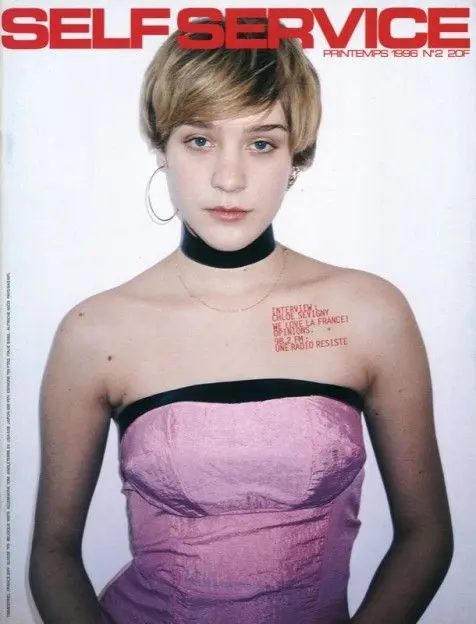 Self Service Magazine
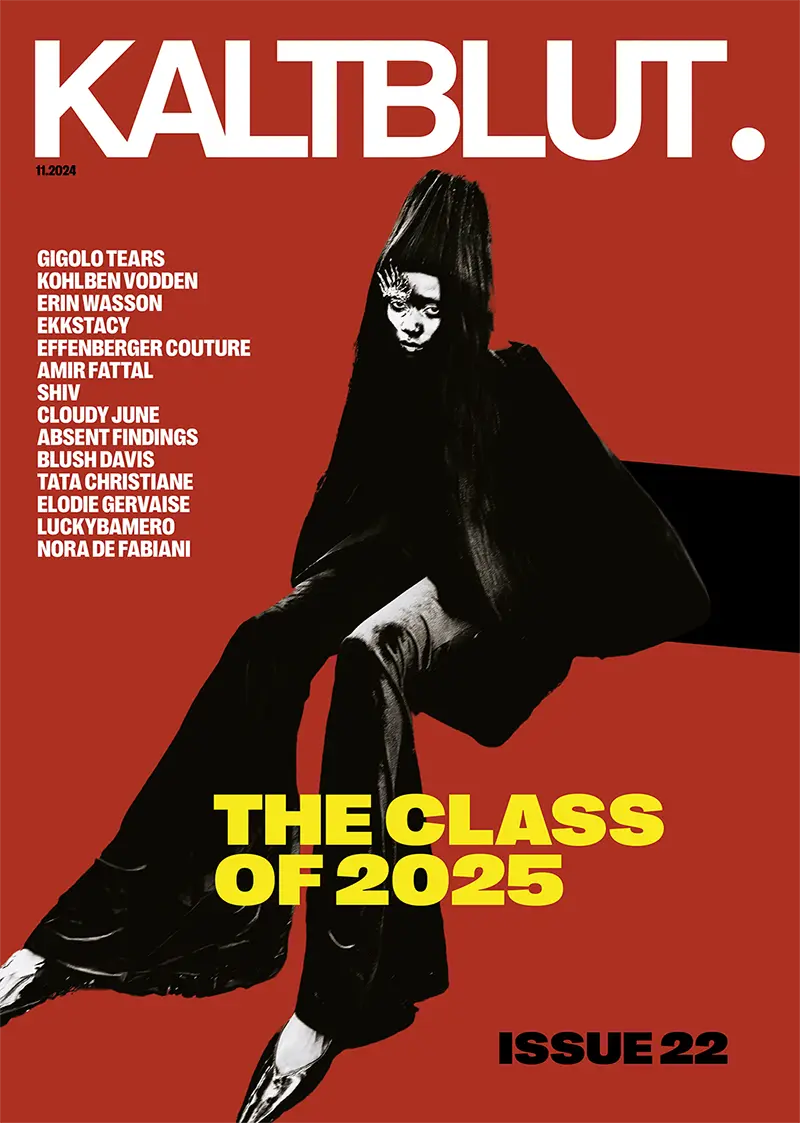 Kaltblut Magazine
Do you have any particular favorite magazine? What is it? Let us know! Notice how all three magazines are very different from each other? It's important to convey a unique brand and that's what each magazine I've shown has successfully done. What's your personal style and how would you convey it with CSS?
Mission 2: The First Stitches (CSS Basics)
Before we can add the rhinestones, we need to know how to thread the needle. In CSS, we use selectors to tell the browser exactly which piece of HTML fabric we want to style.
Want to dye all the paragraphs pink? You select the p tag. Want to style just the collar of your dress? You give that specific HTML element a class (like .collar) or an id (like #statement-collar) and select it in your CSS file. You then open up some curly braces { } and start writing your style rules inside. Time to build your first beautifully styled menu!
Mission 3: The Pink Palette (Color Theory)
Color theory is tech theory! We don't just type the word "pink" and call it a day. We are web designers! We use precise dye mixtures.
In CSS, you'll meet Hex codes (like #e41e81, which is the gorgeous hot pink we use here at P.C.C.), RGB (Red, Green, Blue mixtures), and HSL (Hue, Saturation, Lightness). Knowing how to mix these digital dyes is what separates a basic website from a visually stunning digital editorial. Let's learn how to paint the web!
Mission 4: Typography & Google Fonts
Typography is the actual voice of your website. If your website is wearing a Chanel suit, you can't have it speaking in Comic Sans (unless you're going for deep irony, but let's master the rules before we break them).
We link directly to Google Fonts to import gorgeous, custom typefaces. You'll learn how to adjust the font-family, font-size, font-weight (how bold or delicate the text is), and line spacing so your text reads exactly like a professional magazine spread. Let's practice by styling a typography-heavy layout!
Mission 5: BASIC DESIGN
Now that we have color and typography down, it's time to understand how they work together to create a cohesive user experience. The basics of design are so important. You can only branch away from the tree if you have the fundamentals down.
Mission 6: The Moodboard (Editorial Inspiration)
Before we write another line of code, we need to study the runway! High-fashion magazines are the ultimate cheat code for web design inspiration. We aren't just making websites; we are curating digital editorials.
Take some time to look at the playful, chaotic, and hyper-feminine layouts of Japanese ViVi magazine. Notice the striking, minimalist elegance of Vogue, or the bold, avant-garde styling of L'Officiel. How do they pair their fonts? How do they balance negative space? Start building a visual library in your head.
While you're exploring, dive into the color encyclopedia to discover your favorite hex codes, and test out how different Google Fonts change the entire mood of a word. Find your aesthetic!
Mission 7: Advanced Tailoring (Positioning)
Sometimes you don't want an element to just "go with the flow" of the page. Sometimes you need a specific bow pinned exactly to the top right shoulder of your dress, no matter what. That is CSS Positioning.
Using properties like position: absolute;, relative, or fixed;, you can break the normal rules of the HTML document and stick things exactly where you want them on the screen. It can be tricky (just like draping fabric on a bias), but building this cat painting will give you the exact practice you need.
Mission 8: The Magazine Cutout (Images & Shadows)
A fashion spread is nothing without photography! But raw images in HTML are like unpinned fabric...they just sit there. In CSS, we can tailor our images to look like glossy photo prints or scrapbook cutouts.
We use properties like border-radius to soften harsh corners into perfect circles or elegant ovals. We use box-shadow to make images and text boxes pop off the page with a 3D glow. This is how you take a flat image and turn it into a high-end design element.
Mission 9: Haute Couture Typography
We already learned basic fonts, but let's elevate it. Have you noticed how magazines use massive, stylized first letters for their articles? Or how the spacing between letters in a luxury brand's logo is perfectly airy and delicate?
Using properties like letter-spacing, line-height, and text-transform (to force uppercase elegance), we can manipulate text to look like art. We can even use pseudo-elements like ::first-letter to create massive "Drop Caps" at the start of a paragraph. Let's make your text look expensive.
Mission 10: Lip Gloss & Holographics (Gradients)
Solid pinks are iconic, but what if you want that glossy, early 2000s lip gloss shine? Or a multi-colored holographic backdrop that looks like a CD reflecting light?
CSS Gradients let you blend multiple digital dyes together seamlessly. By using linear-gradient and radial-gradient, you can create backgrounds that shimmer, shift, and instantly upgrade your website from a basic page to an immersive aesthetic experience.
Mission 11: Seasonal Collections (CSS Variables)
Every major fashion house has a "Brand Bible," a strict set of rules for their exact color palettes and font choices. We do this in CSS using Variables!
Instead of typing your favorite pink hex code over and over, you save it in your :root closet as a variable, like `--signature-pink`. If you ever decide to rebrand your entire website for a new season, you change that one variable, and your entire website updates instantly. It’s the ultimate wardrobe quick-change!
Here is the secret to theme swapping:
First, declare your color in the master closet:
:root { --main-brand-color: #facee2; }
Then, apply it to your dresses (elements):
h1 { color: var(--main-brand-color); }
Mission 12: Your First Digital Editorial
Alright, designer. You have your precise color palette, your imported Google Fonts, your styled imagery, and your glossy gradients. It is time to create your first cohesive design project.
For this final mission, you will build a Tribute Page, but we are treating it like a feature article in your favorite magazine. Pick an idol (anyone you want, your favorite designer, or a pop star even), and style a beautiful, typography-heavy editorial page dedicated to them. Experiment with those hex codes, play with text spacing, and make it purely yours. If you don't have this down, that's completely fine. The learning and practicing is more important than having it 100%. You can feel free to move on whenever you feel comfortable with this section.
I also heavily encourage all of you to check out Readymag's "Designing Women" project. It is an incredible showcase of female design history and a massive inspiration for layout engineering, bold typography, and editorial storytelling on the web!
Aesthetic Achieved.
CONGRATS!! You've officially styled your way through the core CSS Design portion of the P.C.C. curriculum! Your websites no longer look like basic outlines! They have soul, color, and structure.